
Instagram’s New Map Feature Raises Privacy Concerns: Here’s How to Disable It

Instagram’s recently launched Map feature is drawing criticism over privacy and safety concerns, particularly for younger users.

The feature, which rolled out last week in the United States, allows users to share their location with a select group of followers. While it is similar to Snapchat’s location-sharing tool, experts warn that it could expose users to stalking or unwanted tracking.

Meta, Instagram’s parent company, said the feature is off by default and only activates if users opt in. However, once enabled, the app updates a user’s location whenever they open or return to the app.
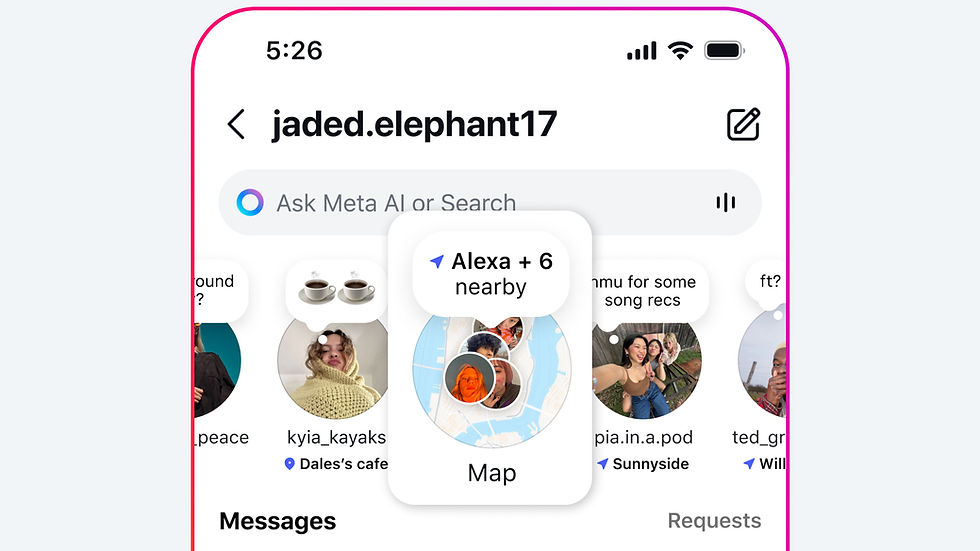
If a user tags a location in a story, post or reel using the location sticker, that content appears on the map for 24 hours. Meta clarified that this does not share a user’s real-time or live location.
Cybersecurity experts have expressed concern that the feature could lead to oversharing. Jake Moore, global cybersecurity advisor at ESET, said the feature risks exposing users’ locations to followers they may not know well.

The feature is currently only available in the U.S., with plans for global expansion in the future.
Parents using Instagram’s supervision tools will receive a notification if their teen begins sharing their location. They can also control whether their teen has access to the feature and view who the teen is sharing their location with.
To disable the Map feature, users can go to the Messages icon in the top right of their feed, then select Map > Settings > No one. Users must tap Update at the bottom to save the changes.
Moore advised users to check the feature periodically, as app updates can sometimes enable features without notice.
Instagram’s Map feature allows location sharing with selected followers
The feature is off by default and only activates if users opt in
Experts warn of privacy risks, especially for teens
Source: FORBES


